
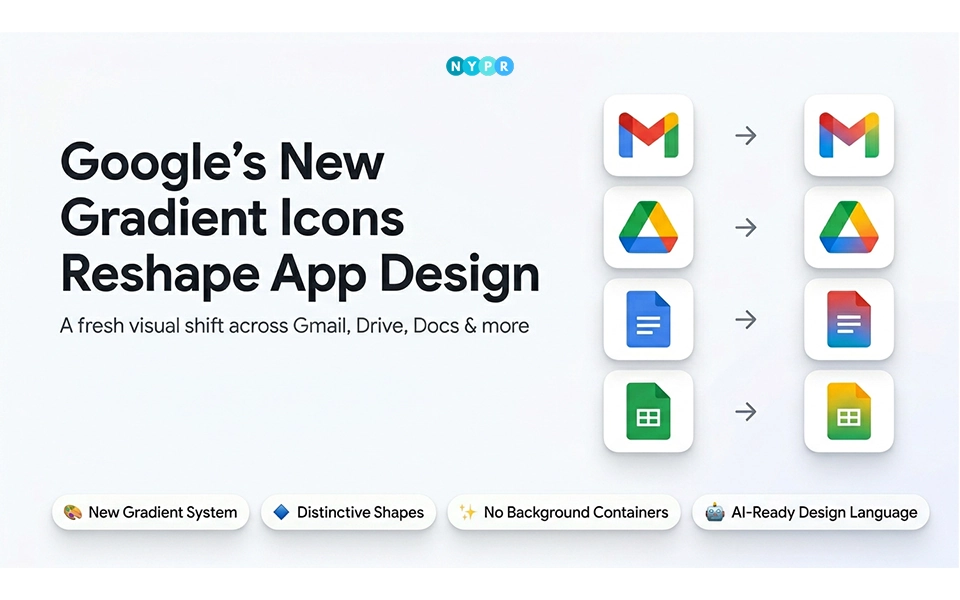
Google has started rolling out its new gradient icons across many of its popular apps. This includes tools people use every day, like Gmail, Drive, Meet, and more.
At first glance, the change may look small. But it actually shows a bigger shift in how Google wants its apps to feel and work. The old flat colors are being replaced with softer gradients, and each icon now looks more unique.
This update also connects with Google’s growing focus on AI, especially with tools like Gemini becoming part of everyday features. For users, it means a cleaner look and apps that are easier to tell apart.
Google New Gradient Icons Mark a Fresh Design Direction
For years, Google followed a very simple rule when designing app icons. Most of them used four bright colors: red, blue, green, and yellow, placed inside basic shapes. It made everything look consistent, but sometimes the apps looked too similar.
Now, that approach is changing.
The new icons use gradients instead of flat colors. That means colors blend into each other, creating a softer and more modern look. The shapes are also more flexible. Some icons are more rounded, while others are sharper on the inside.
Another big change is the removal of heavy backgrounds. Earlier, many icons sat inside solid shapes or containers. Now, those are being reduced or removed, so the icons can adapt better across different screens and themes.
This shift is also linked to AI. Google’s newer tools, especially Gemini, are designed to feel more natural and fluid. The gradient style matches that idea. It feels less rigid and more alive.
Reports from sites like 9to5Google, suggest that this update is already showing up across Android devices and Workspace apps, with more changes expected soon.
A Closer Look at How Each App Is Changing
This change is not consistent across apps. Every app has been updated differently, with different shapes, colours, and styles based on its usage.
Some changes are more visible than others, but they all have the new gradient look.
1. Gmail
Gmail still keeps its familiar envelope “M” shape, so it is easy to recognize. But the lines are now softer and more rounded. Red stands out the most, while the other colors are used lightly. It is also the only icon that still shows all four Google colors together.
2. Google Drive
Drive’s triangle shape remains, but there is a clear change in color use. Red is gone. Now it focuses on green, yellow, and blue. The outer edges look smooth, but the inner lines feel sharper, giving it a cleaner finish.
3. Docs, Sheets, and Slides
These three apps do not change much. They continue with their single-color system. Docs looks like a vertical page, while Sheets and Slides stay in a wider, landscape style. The update here is more about small refinements than big changes.
4. Google Meet
Meet gets one of the most noticeable updates. The camera shape is still there, but yellow becomes the main color. The icon feels brighter and easier to spot, especially when placed next to other apps.
5. Google Chat
Chat now looks more friendly. It uses a pill-shaped message bubble and a softer green color. The design feels a bit like the old Hangouts app, but updated for today’s style.
6. Google Calendar
Calendar takes a slightly different path. It brings back a more realistic look, almost like a physical calendar page. Blue is the main color, and the old multicolor background is gone.
7. Google Tasks
Tasks keep their checkmark symbol, but now it looks more like a button. The design is simple, with blue as the main color, making it easy to understand at a glance.
8. Google Voice
Voice switches to a rounded phone icon in light green. The design feels more focused on work and business use, rather than casual communication.
9. Google Forms
Forms drops the old paper-style icon. Instead, it shows multiple-choice bubbles, which better match what the app actually does. Purple remains the main color.
10. Google Sites
Sites now use a lighter blue shade and a more horizontal layout. This reflects its role in building web pages and makes the icon feel closer to a website structure.
The Reason Behind Google’s New Look
There are a few clear reasons behind this update.
First, AI is becoming a big part of how Google apps work. Tools like Gemini are built to feel smooth and responsive. The new gradient style supports that idea by making the design feel more flexible and modern.
Second, it improves recognition. Earlier, many icons looked too similar because they shared the same colors and shapes. Now, each app has its own look, which helps users find what they need faster.
Third, it creates a cleaner system. By removing heavy backgrounds and simplifying shapes, the icons work better across phones, tablets, and computers. They also look better in both light and dark modes.
Where This Update Makes the Biggest Impact
The change will be visible to most people just by looking at their screens, as the apps begin to change their appearance, but in a way that makes them easier to recognise.
For businesses and teams, it will make it faster to switch between apps. Designers and developers will be watching too, as it signals a new design approach for future apps.
1. Everyday Usage After the Icon Refresh
Most users will notice the change on their home screens first. The apps will look a bit different, but they will still feel familiar. Over time, the clearer designs may make it easier to find apps quickly.
2. Changes Across Workspaces and Teams
Companies that rely on Google Workspace may see small benefits in daily use. When apps are easier to recognize, it can save time, especially during busy workdays.
3. Changes Shaping Design and Development
For designers and developers, this update sets a new direction. It shows that strict color rules are no longer required. Instead, there is more room for creativity while still keeping a unified look.
A Glimpse into Google’s Design Future
Google’s new app logo designs are more than just icons. It’s a signal of a larger shift in the design of future Google apps.
We could see more use of gradients, rounded edges, and dynamic layouts. The idea seems to be a coherent yet not uniform system.
As the AI tools get more sophisticated, the design may adapt to our more natural ways of interacting with technology.
The Path of the Upcoming Update
The rollout is happening slowly. Some users may already see the new icons, while others will get them in the coming weeks or months.
There might be a short period where people need to adjust. When icons change, it can take time to get used to them. But since the core shapes remain similar, the transition should be smooth.
There are still a few unknowns. Not all apps have been updated yet, and it is not clear how far this design style will go. Google may continue refining the look as more feedback comes in.
A Quiet Shift in Google’s Design
Google’s move to gradient icons may seem simple, but it reflects a deeper shift in how its apps are built and presented.
The changes focus on clarity, flexibility, and a closer connection to AI-driven features. Over time, this new design language could shape not just how Google apps look, but how people experience them every day.













Leave a comment