


Cloud spending on GPU power is now one of the biggest line items in tech budgets. Companies that never thought twice about their computing setup are asking hard questions. How much GPU access do they need? What does it cost? Can they even get it? Most of that shift traces back to one chip.
A GPU used to be the thing that made your video games look good. Now it’s the engine behind AI training, scientific research, and a growing share of cloud services. This guide breaks down what a GPU does, how it fits into cloud computing, and what to know before your business rents one.
What Is a GPU?
A graphics processing unit (GPU) is a chip built to handle thousands of small calculations at once. A CPU works differently. It handles tasks one after another, very quickly, in sequence.
That difference matters. Rendering a game frame, training an AI model, and running a physics simulation all involve the same kind of math, repeated across huge amounts of data. A GPU splits that work across thousands of cores and runs it all in parallel. That makes it much faster than a CPU for these specific jobs.
A GPU isn’t a replacement for a CPU, though. It’s a specialist. Most systems, cloud or otherwise, use both together. For a closer look at how the two compare task by task, see our full breakdown of CPU vs. GPU features, uses, and key differences.
What Is GPU Cloud Computing?
GPU cloud computing means renting GPU power over the internet. You don’t buy or run the physical hardware yourself. A cloud provider owns the servers packed with GPUs. You pay for access to that power, usually by the hour, by the minute, or through a longer-term plan.
This works under the same model as regular cloud computing. It’s called infrastructure-as-a-service. Instead of managing servers, you manage workloads. The provider handles the hardware, cooling, power, and upkeep.
How GPUs Are Delivered in the Cloud
Providers typically offer GPU access in a few different ways:
- Bare-metal GPU servers. You get dedicated, physical GPU hardware. No other tenants share it. This is common for large-scale AI training.
- Virtual GPUs (vGPUs). A single physical GPU gets split into smaller virtual slices. Multiple customers can share one chip. This works well for lighter workloads.
- Containerized GPU access. GPUs get allocated to specific containers or workloads through platforms like Kubernetes. This is common in modern AI development.
Which option makes sense depends on how much power you need and how often you need it.
Cloud GPUs vs. Traditional GPUs: What’s the Difference?
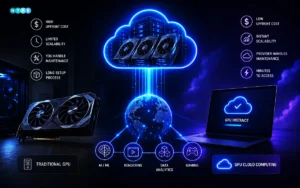
The core hardware is the same. The difference is how you access it and who’s responsible for keeping it running.
| Factor | Cloud GPU | Traditional (On-Premises) GPU |
| Upfront cost | Low pay for usage | High, buy the hardware outright |
| Scalability | Scale up or down instantly. | Limited by what you physically own |
| Maintenance | Handled by the provider | Handled by your own IT team |
| Access speed | Available within minutes | Requires purchase, shipping, setup |
| Best for | Variable or short-term workloads | Constant, predictable, long-term workloads |
Some businesses run GPUs constantly, around the clock. For them, owning hardware can pay off over time. But if your workloads spike, shrink, or shift, cloud GPUs remove the guesswork.
What Are the Primary Applications for GPUs in Cloud Computing?
GPU cloud computing is used across industries because many modern workloads require large-scale parallel processing. As data volumes continue to grow and applications become more complex, traditional computing systems often struggle to keep up with performance demands.
GPUs, with their ability to handle thousands of operations simultaneously, make it possible to process massive datasets efficiently and in real time.
- AI and machine learning. Training and running AI models is the biggest driver of GPU cloud demand right now. We cover this in more depth in our guide to the role of GPUs in artificial intelligence and machine learning.
- Big data analytics and simulations. GPUs speed up everything from financial modeling to weather forecasting.
- Cloud gaming and rendering. Game streaming services and video rendering studios use cloud GPUs to deliver high-end graphics. Players don’t need powerful hardware on their end. If you’re weighing cloud gaming against building your own rig, our roundup of the best graphics cards for gaming in 2026 is a good place to compare specs and prices.
- Scientific and healthcare computing. Medical imaging, genomics, and drug discovery all lean on GPU-accelerated processing. Our post on how GPUs are transforming healthcare AI digs into the specifics.
What Are the Benefits of GPU Cloud Computing?
On-demand scalability. Spin up more GPU power when a project ramps up. Scale back down when it doesn’t. No hardware sits idle.
No hardware maintenance. The provider handles the physical upkeep, driver updates, and cooling. Your team focuses on the work, not the infrastructure.
Access to top-tier chips. The newest, most powerful GPUs are expensive and hard to buy directly. Cloud access lets smaller teams use the same hardware that large enterprises run, without the upfront cost. If your team is deciding whether to rent or buy that hardware, our guide to the best GPU for machine learning and AI in 2026 can help you weigh the options.
Faster time to deployment. You skip the weeks-long wait for hardware to arrive and get set up. A GPU-powered project can start within minutes of signing up.
Global availability. Most major providers run GPU capacity across multiple regions. That helps with latency and with data residency rules.
What Are the Challenges of GPU Cloud Computing?
Despite its many advantages, GPU cloud computing is not without its challenges, and businesses should carefully evaluate these factors before migrating their workloads to the cloud. While cloud-based GPUs offer flexibility, scalability, and access to high-performance computing without heavy upfront investment, they also introduce considerations such as cost management, data security, performance consistency, and dependency on third-party providers.
Understanding these potential limitations is essential for making informed decisions and ensuring that GPU cloud solutions align effectively with an organization’s technical requirements and long-term goals.
Cost management at scale. GPU instances are expensive. Costs can balloon fast if workloads run longer than planned or if GPUs sit idle between jobs.
Availability and wait times. Demand for the newest chips often outpaces supply. Popular models can be backordered or restricted during busy periods.
Data sovereignty and compliance. Industries like healthcare and finance have to watch where their data physically lives and gets processed. That limits which providers and regions they can use.
Vendor lock-in and egress fees. Moving large amounts of data out of one cloud provider and into another can get expensive. That makes switching providers harder than it sounds.
Latency for real-time workloads. Some applications need instant response times. For those, the distance to the GPU server matters, and not every provider has a data center close enough.
How Does GPU Cloud Pricing Work?
GPU cloud pricing depends on several factors, including the GPU model, region, usage duration, resource configuration, and pricing model.
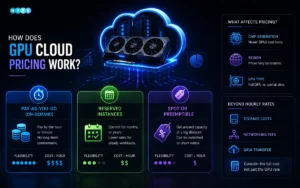
Pay-as-you-go (on-demand). You pay by the hour or minute for whatever GPU capacity you use. There’s no long-term commitment. It’s the most flexible option and the most expensive per hour.
Reserved instances. You commit to a set amount of GPU capacity for a fixed term, usually months or years. In exchange, you get a lower rate. This works well for steady, ongoing workloads.
Spot or preemptible pricing. You get access to unused GPU capacity at a steep discount. The catch is the provider can reclaim it on short notice. This suits workloads that can pause and resume without trouble, like batch processing.
Pricing also shifts based on chip generation, region, and whether you’re renting a full GPU or just a slice of one. Comparing hourly rates alone can be misleading. Storage, networking, and data transfer fees often get added to the bill.
How Cloud GPUs Are Changing Business Strategy
GPU cloud spend used to be an IT decision. Now it’s a budget conversation that reaches company leadership. As more businesses build AI features into their products, GPU access has become as strategic as hiring or marketing spend. Teams track GPU usage the same way they’d track cloud storage or bandwidth. Companies that plan their GPU strategy early tend to move faster than the ones scrambling to catch up once demand hits.
According to Grand View Research, the global cloud computing market is set to grow from roughly $1.19 trillion in 2026 to $3.35 trillion by 2033. GPU-enabled infrastructure is a direct driver of that growth, as businesses build out AI and machine learning capabilities. That kind of trajectory is exactly why GPU access decisions now belong in strategic planning, not just IT tickets.
How to Choose the Right GPU Cloud Provider
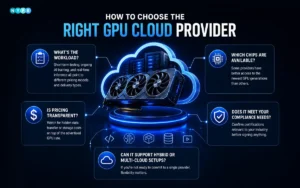
A few questions worth asking before you commit to a provider:
- What’s the workload? Short-term testing, ongoing AI training, and real-time inference all point to different pricing models and delivery types.
- Which chips are actually available, and how consistently? Some providers have better access to the newest GPU generations than others.
- Is pricing transparent? Watch for hidden data transfer or storage costs on top of the advertised GPU rate.
- Does it meet your compliance needs? Confirm certifications relevant to your industry before signing anything.
- Can it support hybrid or multi-cloud setups? If you’re not ready to commit to a single provider, flexibility matters.
As CoreWeave explains, GPU cloud computing gives businesses access to specialized, high-performance hardware without the cost and complexity of building it themselves. That’s really the whole appeal in one sentence.
The Future of GPUs and Cloud Computing
GPUs stopped being a niche piece of hardware once AI, data, and rendering workloads outgrew what CPUs could handle alone. Cloud computing is what made that power accessible. Businesses no longer need to buy, house, and maintain their own GPU racks. They can rent exactly the capacity they need, when they need it, from providers who handle the hardware side entirely.
That shift is why GPU strategy now sits alongside decisions about staffing and marketing spend. It’s not just buried in an IT budget line anymore. Whether you’re scaling an AI product, running data-heavy simulations, or just trying to understand your cloud bill, knowing how GPUs work and how they’re priced puts you in a much better position to make that call.
For more insights into the technologies driving digital transformation, explore our AI & Tech and Cloud & Storage sections, or visit NYPR News for broader coverage of emerging technology, business, and innovation trends.
FAQs
How can businesses reduce GPU cloud computing costs?
Businesses can lower GPU cloud computing costs by choosing the right pricing model, shutting down idle GPU instances, using spot instances for non-critical workloads, and selecting GPUs that match their performance requirements. Monitoring GPU utilization and optimizing storage and data transfer can also significantly reduce overall cloud spending.
What should you look for when choosing a GPU cloud provider?
When selecting a GPU cloud provider, compare GPU availability, pricing transparency, supported GPU models, regional data centers, scalability, security certifications, and networking performance. It's also important to evaluate whether the provider supports AI frameworks, Kubernetes, hybrid cloud deployments, and flexible pricing options that align with your workload.
Which industries benefit the most from GPU cloud computing?
GPU cloud computing is widely used across industries that rely on large-scale data processing and artificial intelligence. Common sectors include healthcare for medical imaging, finance for risk modeling, manufacturing for digital twins, media and entertainment for video rendering, scientific research for simulations, automotive for autonomous vehicle development, and technology companies building AI-powered applications.
Can GPU cloud computing improve AI model training and inference?
Yes. GPU cloud computing significantly accelerates both AI model training and inference by processing thousands of calculations in parallel. This reduces training time, speeds up real-time predictions, and enables businesses to scale machine learning workloads without investing in dedicated GPU infrastructure. Cloud GPUs also provide access to the latest hardware, making it easier to build and deploy advanced AI applications.















Leave a comment